Friday, October 17, 2008

VSS to TFS Conversion Error

Recently I had the pleasure of migrating several VSS databases to Team Foundation Server 2008.  One of the databases was pretty large (90k+ files) and took between 12 - 16 hours to migrate.  However, about 6 hours in to the migration, I kept running across an error that would halt the migration process.

The error:
Could not find file 'C:\Conv\Tfs\<TeamProjectName>\blah\blah\somefile.txt'.

After searching and searching for a solution, I finally ran across this forum post that got me back on track again.  While I cannot take credit for the solution, I would like to add some additional information.

Essentially, Visual Studio Team Foundation Server 2008 will not allow files that use the DOS 8.3 naming convention.  For whatever reason, the VSS database had a reference to the file using the "fully qualified" name as well as the DOS 8.3 name.

During the migration process, VssConvert creates a database on the SQL Server, specified in your MigrationSettings.xml file, called VSStoVersionControlConverterDB.  Within this database, there are about 4 tables, but the ones you need to pay attention to are SCMHistory and VerificationTable.  Based on what I experienced, the SCMHistory table is populated when VssConvert  begins scanning the VSS database for files.  Once the migration piece is actually underway, the VerifcationTable is populated.

As the forum post indicates, you need to delete the file that is causing your error from both of these tables.  What it doesn't say is how...

DECLARE @fileName VARCHAR(255)
SET @fileName = '$/VssRoot/blah/blah/somefi~1.txt'

DELETE FROM SCMHistory WHERE ItemName = @fileName
DELETE FROM VerificationTable WHERE ItemName = @fileName

The only concern that I had was that I didn't want to fix this problem, rerun the migration, and have it fail again in another 8 hours because of some other @#$% file.  While I had the opportunity, I tried a few more options.

At first, I figured I should just delete anything with a ~ in the filename, because that just isn't normal. :)

SELECT * FROM SCMHistory WHERE ItemName LIKE '%~%'
SELECT * FROM VerificationTable WHERE ItemName LIKE '%~%'

Fortunately, I ran SELECT statements first because, to my surprise, there were a ton of files that contained ~.  Some of the files started with ~ and others were based on the DOS 8.3 format.  However, not all of the files using DOS 8.3 format were raising errors as I had verified they migrated over successfully.  I suppose the problem really only exists if a single file is stored in the VSS database in both formats. I did notice that the only time I got a migration error was when the DOS 8.3 file was in VerificationTable.

Ultimately, I decided to run this SQL script and it worked like a charm.

DELETE FROM SCMHistory
WHERE ItemName IN
             (SELECT DISTINCT ItemName FROM VerificationTable
             WHERE ItemName LIKE '%~%')
DELETE FROM VerificationTable
WHERE ItemName LIKE '%~%'

Of course, this is what worked for ME.  You may encounter a different scenario, so be careful to see what you will be deleting before you delete it.  Once you get the error, you should have the opportunity to do an incremental migration provided you didn't serialize your migration scripts. ;)

Also, assuming you want to incrementally migrate, you can open a connection to the VSStoVersionControlConverterDB within SQL and the migration will raise an error that the database could not be deleted.  This will allow you to do some research on your files and prepare for what needs to be deleted during your next migration attempt.

NOTE:  Depending on the number of files being converted, you may have to be very quick on the draw in order to delete your contaminated database records.

Tuesday, November 27, 2007

STSADM -- Access Denied

While attempting to deploy some SharePoint code via MSBuild, I ran in to the following problem.

I have a msbuild.proj that executes several stsadm commands. These work perfectly when executed from the command-line. However, once they are called from TeamBuild, I get "Access Denied" on the stsadm execution.

The TFS Service account is a member of the Administrators group on the build server. I can login to the build server as the TFS Service account and execute the command-line successfully. This problem only exists when the commands are spawned from TeamBuild.

I have also tried running several EXEC tasks using runas /trustlevel:unrestricted and various other options with no success.

After several, and far too many, hours attempting to resolve the problem myself, I burned a PSS with Microsoft to resolve this issue.

Here is what I had to do. Even though the TFS Service Account was a member of the Administrators group on the Build Server, I continually received Access Denied errors. The suspicion was that the TFS Service Account, when run from TeamBuild, was not executing as an interactive/desktop user. Therefore, there wasn't a profile that was being used. While I don't claim to fully understand why I was getting the errors, we did reach a solution.

I opened regedit and gave full control to the TFS Service Account for the following keys and their sub-keys. I would imagine Read Only access would work, but I have not explored further. Please let me know if you find anything else that may work.

  • HKLM\Software\Microsoft\SystemCertificates\
  • HKLM\Software\Microsoft\EnterpriseCertificates\
  • HKLM\Software\Microsoft\WBEM\

Wednesday, November 14, 2007

Stupid, Stupid, Stupid... Me!

I hate to admit that I have been plagued by this stupid BizTalk error for weeks now.  I must say that I haven't been focusing on this particular issue the entire time, but when I did it wasn't pretty.  I was never able to wrap my head around the problem, and even worse, the solution.  Until...

The error:
MyOrchestration.odx(783,59): error CS1026: ) expected
MyOrchestration.odx(782,10): error CS1518: Expected class, delegate, enum, interface, or struct

I would receive this error only when a particular orchestration was included in my project.  However, the orchestration that reports the error is not the one causing the error, but the first active orchestration in my directory.  If I set the build action of the offending orchestration to none, the error would go away.  I can say this with 100% certainty that this was the root of my problem as I tried all combinations of which orchestrations were included and found only one causing me grief.

Being the friendly error message that it was, I opened the orchestration using the Xml Editor and took a look under the hood.  The line being referenced was the last line of the file.  In other words, there was no code where the error was supposed to be.  In the past, I had run in to cases where the generated C# code was corrupt, so I deleted all of that section and started over.  Still, I got the same error.  I even tried deleting that orchestration and starting from scratch.  I finally was able to narrow it down to an error somewhere in my mapping and schema files.  Further analysis showed me that the schema reference section was including some very strange data.  Essentially, my source schema looked something like this:

<xs:schema xmlns:b="http://schemas.microsoft.com/BizTalk/2003" xmlns="http://schemas.companyname.com/projectname/FileType_FF&quot; targetNamespace=&quot;http://schemas.companyname.com/projectname/FileType_FF" targetNamespace="http://schemas.companyname.com/projectname/FileType_FF&quot; targetNamespace=&quot;http://schemas.companyname.com/projectname/FileType_FF" xmlns:xs="http://www.w3.org/2001/XMLSchema">

Since this schema was created using the Flat File Wizard, I'm not entirely certain how in the world this happened, but it sure did throw me for a loop.  Especially because the error message had nothing to do with the actual error.  Googling for the error message didn't return any helpful results.  If you are one of the unlucky souls to receive this error, hopefully this will give you some assistance.

Thursday, September 13, 2007

Something brewing... Not ready for Prime Time.

It's been quiet on the blogging front for awhile.  Things have been pretty quiet at work and nothing of great value has been discovered.  I have been playing with WPF and WCF a bit.  I hooked up BTS 2006 to a WCF Send Port which was pretty cool.  I didn't think the transport properties form was very "friendly".  There were several values that were provided as drop-downs, but the drop-down boxes were empty.  I had to go to the BTSNTSVC.exe.config file to determine the proper values.  Once I got beyond that, I was rockin' and rollin'.  I'm thinking of setting up a VM with R2 on it and playing with it a little more.  I'll post my findings as they come.  Other than that, I have really enjoyed playing with WPF and LINQ.  Some very cool stuff, not what I am doing, but the technology. :)

Tuesday, August 7, 2007

PGP Pipeline Component v1.1

I ran across a few things that I needed to update and have posted them here as well.

Notable changes include:

  • Added Pipeline Component property of Extension. This allows you to specify what extension you want to place at the end of your encrypted file. The default value is PGP.
  • Added capability to decrypt a signed message.
  • Updated decryption to handle other than .PGP extension. Previously hard coded to remove only the .pgp from the filename.
  • Updated TestFixture form to be more user friendly. You can now specify where you want your output file to be generated.
  • Minor code changes that don't necessarily affect logic, but may improve performance.

Link to readme.txt: readme.txt
Link to dll: BAJ.BizTalk.PipelineComponent.PGP.dll
Link to source code: PGP.zip

[UPDATED - 9/11/2007] - It was brought to my attention that I did not include instructions for obtaining the crypto.dll file. In my original post, I mentioned that you had to download the Bouncy Castle source code as I didn't feel it was appropriate for me to distribute it. Also, you will need to strongly name the assembly. I have updated the readme.txt file with the same message. Sorry for any confusion.

[UPDATED - 7/28/2009] - File locations have been updated and should be available for download.

BizTalk SMTP Adapter is Missing BCC Functionality

Ok, so this probably comes to no surprise to many of you.  I remember running in to this problem when I was using BTS 2004.  However, I thought that the community's cries would be answered with BTS 2006.  I have not had a need for it until now, so I never checked, but again the ability to BCC using the SMTP Adapter does not exist.  Fortunately, there are many ways to skin this cat.  The first 2 that come to mind are:

  1. Create 2 separate email messages within BizTalk: 1 for your original recipients, and 1 for your BCC recipients
    1. Don't forget to tell them they received this as a BCC and list the original recipients.
    2. Yeah... won't end up biting you in the butt later on.
  2. Create a referenced assembly to manage your SMTP needs.
    1. Again, there are tons of SMTP DLLs floating around in the ether, but you can easily create your own with very little code.  Depending how basic your needs are, you can accomplish it with very few lines of code. 

      using System.Net.Mail;

      SmtpClient client = new SmtpClient("server");
      using (MailMessage message = new MailMessage("from", "to", "subject", "Body"))
      {
          client.Send(message);
      }

      But if your needs were that simple, you could just use the SMTP Adapter.

Anyway, I whipped up some code that would handle my needs.  I did not need to support attachments, although it shouldn't be too difficult to modify my code to include them.

Essentially, I created 2 classes:  SMTPHelper and SMTPMessage.

SMTPMessage contains the necessary property values used to send an email.
SMTPHelper contains a single method (SendMail) that accepts a SMTPMessage parameter.  SendMail uses the values within the SMTPMessage object to create SmtpClient and MailMessage objects and perform the necessary actions to deliver the email.  Basic error handling is included, but can surely be expanded upon.

Within BizTalk, I created a variable called smtpMessage of type BAJ.Utilities.SMTPMessage.  Inside my orchestration, I placed the following code within an expression shape.

smtpMessage = new BAJ.Utilities.SMTPMessage();

smtpMessage.SMTPServer = smtpServer;
smtpMessage.FromAddress = smtpFromAddress;
smtpMessage.FromName = smtpFromName;
smtpMessage.ToList = strToList;
smtpMessage.CCList = "";
smtpMessage.BCCList = strBCCList;
smtpMessage.Subject = "[enter subject here]";
smtpMessage.Body = "[enter message here]";
smtpMessage.IsHTML = true;
smtpMessage.Priority = System.Net.Mail.MailPriority.Normal;

BAJ.Utilities.SMTPHelper.SendMail(smtpMessage);

In my process, smtpServer, smtpFromAddress, and smtpFromName are all string variables whose values are stored as AppSettings.

Here is the code for my SMTPHelper class:  SMTPHelper.zip

FTP, PGP, and Me

So let me break this down for you...

Company A (Acme, Inc) wants to exchange data with Company C (Charlie Company). However, I represent Company B (BizTalk United) and we want to collect some of the data as well. A requirement has been made that all data will be transmitted using FTP and will also be encrypted. So, as the broker of the integration, I must resolve how to get data from point A to C and still be able to read the data myself.

The solution:

  • Company A will encrypt their file using the public key from Company B and transmit the file via FTP.
  • Company B will decrypt the file using their private key, encrypt the file again using the public key from Company C and transmit the file via FTP.

Sounds simple enough once you get passed the PGP Pipeline Component. However, there is another interesting wrinkle in this process. Because both companies (A and C) want to prevent retrieving a file from the FTP server in mid-stream, they have decided to upload a 0 byte file immediately after posting the data file. The existence of the 0 byte file indicates the data file is ready for download. Once again, you can certainly update your FTP ReceiveLocation properties to only get the 0 byte files based on the proper mask, but how do you get the actual .pgp file from the FTP Server?

Here is how I did it. Please let me know if you have any other recommendations or suggestions as I am always open to improvement.

1 - Download the 0 byte file (and PGP file)
I download the 0 byte file from the FTP server using the FTP receive adapter. The message is received by an Orchestration, and all processes execute from within this single Orchestration. Upon receipt of the file, I strip off the FTP server name, port, directory, and filename from the BTS.InboundTransportLocation and FILE.ReceivedFileName message properties. These values, along with some appSettings keys containing the FTP credentials, are used to execute a FTP download request using the FtpWebRequest class. Luckily, the 0 byte file and the data file share the same filename with the exception of the extension. The downloaded file is stored on the local hard drive in a temporary location of your choosing.

2 - Decrypt the PGP file
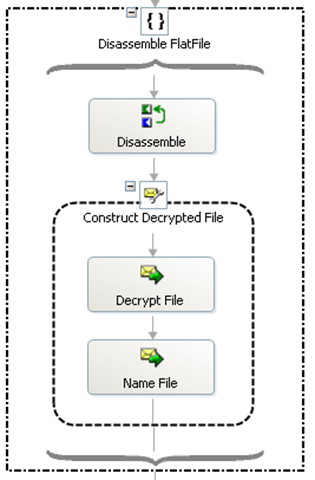
Once the PGP file is stored locally, I used some code (courtesy of MSDN) to load the file in to an XLANGMessage. With my PGP file now safely tucked away in a BizTalk message (of type XmlDocument of course), I can use the ExecuteReceivePipeline method to disassemble the encrypted message in to plain text.

clip_image0012_thumb

Note: This must be done within an Atomic scope.

The Disassemble shape contains the following code:

pipeOutput = Microsoft.XLANGs.Pipeline.XLANGPipelineManager.ExecuteReceivePipeline(
typeof(Namespace.Pipelines.Receive.Decrypt),
msgEncrypted);

The Decrypt File shape contains the following code:

pipeOutput.MoveNext();
msgDecrypted = new System.Xml.XmlDocument();
pipeOutput.GetCurrent(msgDecrypted);

And the Name File shape simply strips the ".pgp" from the filename.

Now I have a decrypted version of the file.

3 - Re-Encrypt the decrypted file
Since I have a message containing the decrypted version of the file, I can use the ExecuteSendPipeline method to encrypt the file for Company C.

clip_image0013_thumb[4]

Note: This must be done within an Atomic scope.

The Assemble File shape contains the following code:

msgEncrypted_New = new System.Xml.XmlDocument();

pipeInput.Add(msgDecrypted);

Microsoft.XLANGs.Pipeline.XLANGPipelineManager.ExecuteSendPipeline(
typeof(Namespace.Pipelines.Send.Encrypt),
pipeInput,
msgEncrypted_New);

The Name File shape simply appends the ".pgp" to the filename.

4 - Upload the Encrypted File (and 0 byte file)
Now that I have a newly encrypted file, I can use the FTP send adapter to transfer the files. Obviously, I will first send the PGP file, and using the same port, transfer the 0 byte file.

5 - Process the data
Once I have dealt with the housekeeping of decrypting, encrypting and transferring files from A to C, I am able to process my data. Similar to the process used in Step 2, I will disassemble the file within the Orchestration and farm out the work from there.

Sub-Topic: Oh crap, the decrypted file is empty
I found out the hard way that Company A was going to send an encrypted file and 0 byte file, regardless of whether the encrypted file, once decrypted, actually contained data. This started throwing massive kinks into my process. The main error I received was:

Inner exception: The part 'part' of message 'msgDecrypted' contains zero bytes of data.
Exception type: EmptyPartException
Source: Microsoft.XLANGs.Engine

After banging my head against a brick wall for 2 days, I came up with a workaround (HACK) that accomplishes my goal.

Instead of decrypting the file inside the orchestration, I am using a dynamic port along with the decrypt pipeline to create a physical version of the file in a temporary location. I then get the length of the file to determine my next steps.

  • If the file length > 0, I use the IStreamFactory method to construct my decrypted message.
  • If the file length = 0, I simply assign the 0 byte file (from the initial receive) to my decrypted message.

Now I am able to proceed successfully. Once all files have been Decrypted, Encrypted, and transferred successfully, I delete the local copies from the hard drive.

Of the many things I tried with unsuccessful results, this one still puzzles me as to why it didn't work. From what I can tell, once the EmptyPartException bell has been rung, you can't un-ring it.

I used an exception handler to catch the Microsoft.XLANGs.BaseTypes.EmptyPartException. This error was only thrown if I reached a persistence point within my scope. In my exception handler, I attempted to reassign the decrypted message with either the initial receive message, and empty XmlDocument, a dummy XmlDocument, contents from another file, but regardless of how I tried to assign the value, once the error was raised, I couldn't get passed it.

Again, please let me know if you see a better way of handling this, I am always looking for improvement.