It's been quiet on the blogging front for awhile. Things have been pretty quiet at work and nothing of great value has been discovered. I have been playing with WPF and WCF a bit. I hooked up BTS 2006 to a WCF Send Port which was pretty cool. I didn't think the transport properties form was very "friendly". There were several values that were provided as drop-downs, but the drop-down boxes were empty. I had to go to the BTSNTSVC.exe.config file to determine the proper values. Once I got beyond that, I was rockin' and rollin'. I'm thinking of setting up a VM with R2 on it and playing with it a little more. I'll post my findings as they come. Other than that, I have really enjoyed playing with WPF and LINQ. Some very cool stuff, not what I am doing, but the technology. :)
Thursday, September 13, 2007


Tuesday, August 7, 2007
PGP Pipeline Component v1.1
I ran across a few things that I needed to update and have posted them here as well.
Notable changes include:
- Added Pipeline Component property of Extension. This allows you to specify what extension you want to place at the end of your encrypted file. The default value is PGP.
- Added capability to decrypt a signed message.
- Updated decryption to handle other than .PGP extension. Previously hard coded to remove only the .pgp from the filename.
- Updated TestFixture form to be more user friendly. You can now specify where you want your output file to be generated.
- Minor code changes that don't necessarily affect logic, but may improve performance.
Link to readme.txt: readme.txt
Link to dll: BAJ.BizTalk.PipelineComponent.PGP.dll
Link to source code: PGP.zip
[UPDATED - 9/11/2007] - It was brought to my attention that I did not include instructions for obtaining the crypto.dll file. In my original post, I mentioned that you had to download the Bouncy Castle source code as I didn't feel it was appropriate for me to distribute it. Also, you will need to strongly name the assembly. I have updated the readme.txt file with the same message. Sorry for any confusion.
[UPDATED - 7/28/2009] - File locations have been updated and should be available for download.
BizTalk SMTP Adapter is Missing BCC Functionality
Ok, so this probably comes to no surprise to many of you. I remember running in to this problem when I was using BTS 2004. However, I thought that the community's cries would be answered with BTS 2006. I have not had a need for it until now, so I never checked, but again the ability to BCC using the SMTP Adapter does not exist. Fortunately, there are many ways to skin this cat. The first 2 that come to mind are:
- Create 2 separate email messages within BizTalk: 1 for your original recipients, and 1 for your BCC recipients
- Don't forget to tell them they received this as a BCC and list the original recipients.
- Yeah... won't end up biting you in the butt later on.
- Create a referenced assembly to manage your SMTP needs.
- Again, there are tons of SMTP DLLs floating around in the ether, but you can easily create your own with very little code. Depending how basic your needs are, you can accomplish it with very few lines of code.
using System.Net.Mail;
SmtpClient client = new SmtpClient("server");
using (MailMessage message = new MailMessage("from", "to", "subject", "Body"))
{
client.Send(message);
}But if your needs were that simple, you could just use the SMTP Adapter.
- Again, there are tons of SMTP DLLs floating around in the ether, but you can easily create your own with very little code. Depending how basic your needs are, you can accomplish it with very few lines of code.
Anyway, I whipped up some code that would handle my needs. I did not need to support attachments, although it shouldn't be too difficult to modify my code to include them.
Essentially, I created 2 classes: SMTPHelper and SMTPMessage.
SMTPMessage contains the necessary property values used to send an email.
SMTPHelper contains a single method (SendMail) that accepts a SMTPMessage parameter. SendMail uses the values within the SMTPMessage object to create SmtpClient and MailMessage objects and perform the necessary actions to deliver the email. Basic error handling is included, but can surely be expanded upon.
Within BizTalk, I created a variable called smtpMessage of type BAJ.Utilities.SMTPMessage. Inside my orchestration, I placed the following code within an expression shape.
smtpMessage = new BAJ.Utilities.SMTPMessage();
smtpMessage.SMTPServer = smtpServer;
smtpMessage.FromAddress = smtpFromAddress;
smtpMessage.FromName = smtpFromName;
smtpMessage.ToList = strToList;
smtpMessage.CCList = "";
smtpMessage.BCCList = strBCCList;
smtpMessage.Subject = "[enter subject here]";
smtpMessage.Body = "[enter message here]";
smtpMessage.IsHTML = true;
smtpMessage.Priority = System.Net.Mail.MailPriority.Normal;BAJ.Utilities.SMTPHelper.SendMail(smtpMessage);
In my process, smtpServer, smtpFromAddress, and smtpFromName are all string variables whose values are stored as AppSettings.
Here is the code for my SMTPHelper class: SMTPHelper.zip
FTP, PGP, and Me
So let me break this down for you...
Company A (Acme, Inc) wants to exchange data with Company C (Charlie Company). However, I represent Company B (BizTalk United) and we want to collect some of the data as well. A requirement has been made that all data will be transmitted using FTP and will also be encrypted. So, as the broker of the integration, I must resolve how to get data from point A to C and still be able to read the data myself.
The solution:
- Company A will encrypt their file using the public key from Company B and transmit the file via FTP.
- Company B will decrypt the file using their private key, encrypt the file again using the public key from Company C and transmit the file via FTP.
Sounds simple enough once you get passed the PGP Pipeline Component. However, there is another interesting wrinkle in this process. Because both companies (A and C) want to prevent retrieving a file from the FTP server in mid-stream, they have decided to upload a 0 byte file immediately after posting the data file. The existence of the 0 byte file indicates the data file is ready for download. Once again, you can certainly update your FTP ReceiveLocation properties to only get the 0 byte files based on the proper mask, but how do you get the actual .pgp file from the FTP Server?
Here is how I did it. Please let me know if you have any other recommendations or suggestions as I am always open to improvement.
1 - Download the 0 byte file (and PGP file)
I download the 0 byte file from the FTP server using the FTP receive adapter. The message is received by an Orchestration, and all processes execute from within this single Orchestration. Upon receipt of the file, I strip off the FTP server name, port, directory, and filename from the BTS.InboundTransportLocation and FILE.ReceivedFileName message properties. These values, along with some appSettings keys containing the FTP credentials, are used to execute a FTP download request using the FtpWebRequest class. Luckily, the 0 byte file and the data file share the same filename with the exception of the extension. The downloaded file is stored on the local hard drive in a temporary location of your choosing.
2 - Decrypt the PGP file
Once the PGP file is stored locally, I used some code (courtesy of MSDN) to load the file in to an XLANGMessage. With my PGP file now safely tucked away in a BizTalk message (of type XmlDocument of course), I can use the ExecuteReceivePipeline method to disassemble the encrypted message in to plain text.
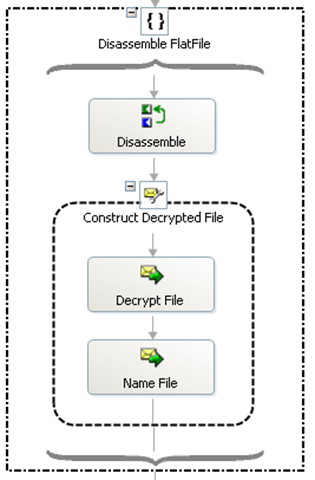
Note: This must be done within an Atomic scope.
The Disassemble shape contains the following code:
pipeOutput = Microsoft.XLANGs.Pipeline.XLANGPipelineManager.ExecuteReceivePipeline(
typeof(Namespace.Pipelines.Receive.Decrypt),
msgEncrypted);
The Decrypt File shape contains the following code:
pipeOutput.MoveNext();
msgDecrypted = new System.Xml.XmlDocument();
pipeOutput.GetCurrent(msgDecrypted);
And the Name File shape simply strips the ".pgp" from the filename.
Now I have a decrypted version of the file.
3 - Re-Encrypt the decrypted file
Since I have a message containing the decrypted version of the file, I can use the ExecuteSendPipeline method to encrypt the file for Company C.
![clip_image0013_thumb[4]](http://www.intellitechture.com/wp-content/uploads/2009/07/clip_image00132.png "clip_image0013_thumb[4]")
Note: This must be done within an Atomic scope.
The Assemble File shape contains the following code:
msgEncrypted_New = new System.Xml.XmlDocument();
pipeInput.Add(msgDecrypted);
Microsoft.XLANGs.Pipeline.XLANGPipelineManager.ExecuteSendPipeline(
typeof(Namespace.Pipelines.Send.Encrypt),
pipeInput,
msgEncrypted_New);
The Name File shape simply appends the ".pgp" to the filename.
4 - Upload the Encrypted File (and 0 byte file)
Now that I have a newly encrypted file, I can use the FTP send adapter to transfer the files. Obviously, I will first send the PGP file, and using the same port, transfer the 0 byte file.
5 - Process the data
Once I have dealt with the housekeeping of decrypting, encrypting and transferring files from A to C, I am able to process my data. Similar to the process used in Step 2, I will disassemble the file within the Orchestration and farm out the work from there.
Sub-Topic: Oh crap, the decrypted file is empty
I found out the hard way that Company A was going to send an encrypted file and 0 byte file, regardless of whether the encrypted file, once decrypted, actually contained data. This started throwing massive kinks into my process. The main error I received was:
Inner exception: The part 'part' of message 'msgDecrypted' contains zero bytes of data.
Exception type: EmptyPartException
Source: Microsoft.XLANGs.Engine
After banging my head against a brick wall for 2 days, I came up with a workaround (HACK) that accomplishes my goal.
Instead of decrypting the file inside the orchestration, I am using a dynamic port along with the decrypt pipeline to create a physical version of the file in a temporary location. I then get the length of the file to determine my next steps.
- If the file length > 0, I use the IStreamFactory method to construct my decrypted message.
- If the file length = 0, I simply assign the 0 byte file (from the initial receive) to my decrypted message.
Now I am able to proceed successfully. Once all files have been Decrypted, Encrypted, and transferred successfully, I delete the local copies from the hard drive.
Of the many things I tried with unsuccessful results, this one still puzzles me as to why it didn't work. From what I can tell, once the EmptyPartException bell has been rung, you can't un-ring it.
I used an exception handler to catch the Microsoft.XLANGs.BaseTypes.EmptyPartException. This error was only thrown if I reached a persistence point within my scope. In my exception handler, I attempted to reassign the decrypted message with either the initial receive message, and empty XmlDocument, a dummy XmlDocument, contents from another file, but regardless of how I tried to assign the value, once the error was raised, I couldn't get passed it.
Again, please let me know if you see a better way of handling this, I am always looking for improvement.
PGP Pipeline Component
Recently I was required to perform some PGP encryption and decryption of files. Realizing this was going to require a custom Pipeline Component, off I went to Google to find one. Hey, why reinvent the wheel.
I'm not certain why Microsoft didn't put one in place with the release of BTS 2006, but who am I to judge. :)
The ones that kept popping up:
- Gnu Privacy Guard (GPG/PGP) for .NET [v1.0]
- Pro BizTalk 2006 (Pro) (Paperback) by George Dunphy (Author), Ahmed Metwally (Author)
- And a few others that wanted you to buy it. Sorry, but I'm not going to buy something I can write myself.
GnuPG
This one works very well. I actually used GnuPG when creating a pipeline component for another project. However, it is a command line program and requires installation and key management before it works. While I knew this would get the job done, I wanted to use something that could be automatically deployed from machine to machine.
Pro BizTalk 2006
Since I have not purchased this book, I don't have access to the code. Again, I don't want to buy something I know I can do.
Don't get me wrong, I'm not opposed to buying code, but it needs to make sense. And in this case, it didn't. Especially since I have done this before and knew the job could be performed in the allotted timeframe. Also, I have nothing against this book. It comes highly reviewed. I'm just a little put-off about buying another BizTalk book. I waited and waited for the official BTS 2004 book to come out and was very disappointed. Ok, so I need to get over it. I will probably buy a BTS 2006 book eventually. I just don't know which one. [end rant]
Bouncy Castle Crypto
A co-worker pointed me in the direction of the Bouncy Castle C# API. They give you the DLL as well as the source code. The only problem I ran in to was that the DLL was not strongly named. Once I resolved that issue I was off and running. This gave me the ability to easily deploy from server to server. The only thing I had to do was GAC the DLL and copy the keys.
Here is the code for the PGP Pipeline component. I did not distribute the necessary crypto.dll, so you will need to get it from Bouncy Castle. Remember, you will need to get the source in order to strongly name the assembly.
[UPDATED - 7/27/2007] - I have updated the code and source with version 1.1.
Link to readme.txt: readme.txt
Link to dll: BAJ.BizTalk.PipelineComponent.PGP.dll
Link to source code: PGP.zip
Notes:
- I can't get the stupid icon to appear for whatever reason. If you spot my error, please let me know so I can fix it.
- The project has a Post Build Event that will copy the DLL to C:\Program Files\Microsoft BizTalk Server 2006\Pipeline Components.
- You may need to change the path based on your environment.
- You will receive a build failure if you have a project open that references that file. Also, you may need to stop your BizTalk host before compilation once you have deployed and used the component.
- The code assumes you already have the necessary Public and/or Private keys. I did not include a way to generate the pair.
- Be careful when testing. I chased around this error message for almost an hour before I realized what was happening: Could not find file 'C:\Temp\testfile.txt'.
- The PGP Pipeline Component expects the encrypted version of the file and the decrypted version of the file to have the same name with the exception of the .PGP extension. If you encrypt somefile.txt, it becomes somefile.txt.pgp. If you then rename somefile.txt.pgp to differentfile.txt.pgp, the crypto.dll writes the decrypted file to somefile.txt.
- Because I wasn't sure what the end-user's desired outcome should be (error if the filenames don't match, always use the filename of the message, etc.) I left it alone and created a DecryptFileAsStream() method that does not create a file, but returns the decrypted content as a Stream.
- I had thought about adding a property to specify the temporary location where the file is written during encryption/decryption but have not had time to add it. Currently, it will place the temporary files in C:\Windows\System32.
- Ok, so now I have added it. :)
Feedback welcomed.
Search and Replace Pipeline Component
Ok. So this isn't the fanciest of things, but it really saved my bacon.
Problem: I have a predefined flat file schema to transform a fixed-length positional file. However, for some unknown reason, random records in the file extend beyond extend beyond the specified record length. I was able to deduce that those records consistently contained a certain value instead of what was expected. They should have been passing a series of zeroes, but instead converted them to decimals. Instead of 00000000 I was getting 00000000.00000000. I tried a few other solutions, but wound up with the need for a custom pipeline component.
I will assume you are somewhat familiar with the creation of pipeline components. I am certainly no expert myself. For further details, check this page out (MSDN - Developing Pipeline Components) or give Google a shot.
First, I declared my 2 properties:
private string searchString = null;
[System.ComponentModel.Description("Find what:")]
public string SearchString
{
get { return searchString; }
set { searchString = value; }
}private string replaceString = null;
[System.ComponentModel.Description("Replace with:")]
public string ReplaceString
{
get { return replaceString; }
set { replaceString = value; }
}
Then, I created my IBaseComponent Members: Description, Name, and Version.
And then, I created my IPersistPropertyBag Members: GetClassID, InitNew, Load, and Save.
And then, I created my IComponentUI Members: Icon.
Finally, I created my IComponent Members: Execute. This is the heart of the component where the real work is performed. Essentially, I take the message, extract the BodyPart and load the BodyPart's Data in to a StreamReader. Now I am able to load the context of the message in to a string and perform my simple search and replace. This sample does not handle for case sensitivity, or anything super fancy as I only did what fit my needs.
IBaseMessage Microsoft.BizTalk.Component.Interop.IComponent.Execute(IPipelineContext pContext, IBaseMessage pInMsg)
{
System.Diagnostics.Debug.WriteLine("Begin Execute method for Search and Replace pipeline component.");
IBaseMessagePart bodyPart = pInMsg.BodyPart;
string tmpString = "";
if (bodyPart != null)
{
try
{
System.IO.StreamReader sr = new System.IO.StreamReader(bodyPart.Data);tmpString = sr.ReadToEnd();
System.Diagnostics.Debug.WriteLine(String.Format("Replacing [{0}] with [{1}].", this.searchString, this.replaceString));
tmpString = tmpString.Replace(this.searchString, this.replaceString);System.IO.MemoryStream strm = new System.IO.MemoryStream(ASCIIEncoding.Default.GetBytes(tmpString));
strm.Position = 0;
bodyPart.Data = strm;
pContext.ResourceTracker.AddResource(strm);
}
catch (System.Exception ex)
{
throw ex;}
}
return pInMsg;
}
If you are interested in full source, please drop me a line.
BizTalk - fatal error X1001: unknown system exception
The other day I ran across a very puzzling error: fatal error X1001: unknown system exception
Fortunately, the error message was so descriptive; I was able to resolve my problem right away.
Ok, so I couldn't, for the life of me, figure out what I had done wrong that would produce such a nasty error. Upon closing Visual Studio and re-opening the solution, I still received the same error message. Google and newsgroups proved to be of little help - a rare occurrence for me. Unfortunately, "unknown system exception" could stand for a variety of problems. However, I did stumble across one link that managed to solve my problem.
Jan Eliasen's post definitely got me back on track. Essentially, I had created a decision block to "comment" out some code. However, in my else branch, I had a Call Orchestration shape. Apparently, BizTalk does not like to have a Call or Start Orchestration shape at an unreachable code location.
Since I was using a 1==1 expression as my first rule, the else branch would never be reached.
As I see it, there are 2 workarounds:
- Delete the Start/Call Orchestration shape from the "unreachable code"
- The only problem with this option is you have to remember to put it back.
- Use a variable instead of 1 == 1
- The trick would be to declare a variable (i) with a default value of 1. Then, use the expression i == 1. A little crude, but it works.